Situation, Canada

Texts and chats as proof of contact for Canadian spousal sponsorship

IRCC asks some couples for printed chats and caps them at 10 pages. Here is who has to send them, how to get them off your phone, and how to choose 10 pages that cover the whole relationship.

Facts checked November 5, 2026, from 13 primary sources

On this page

Short answer

Yes, IRCC accepts printed text messages, WhatsApp and other social media chats as "proof of contact" for a spousal sponsorship. Its checklist asks for them when you and your spouse don't live together, with proof of the sponsor's visits, and allows a maximum of 10 pages. Choose dated exchanges from across the relationship, show the sender and date on each message, and get a proper translation of anything not in English or French.

General information, not legal advice. This page has not been reviewed by a lawyer. Rules differ by court and place, and they change. For advice on your situation, talk to a lawyer or a legal aid service.

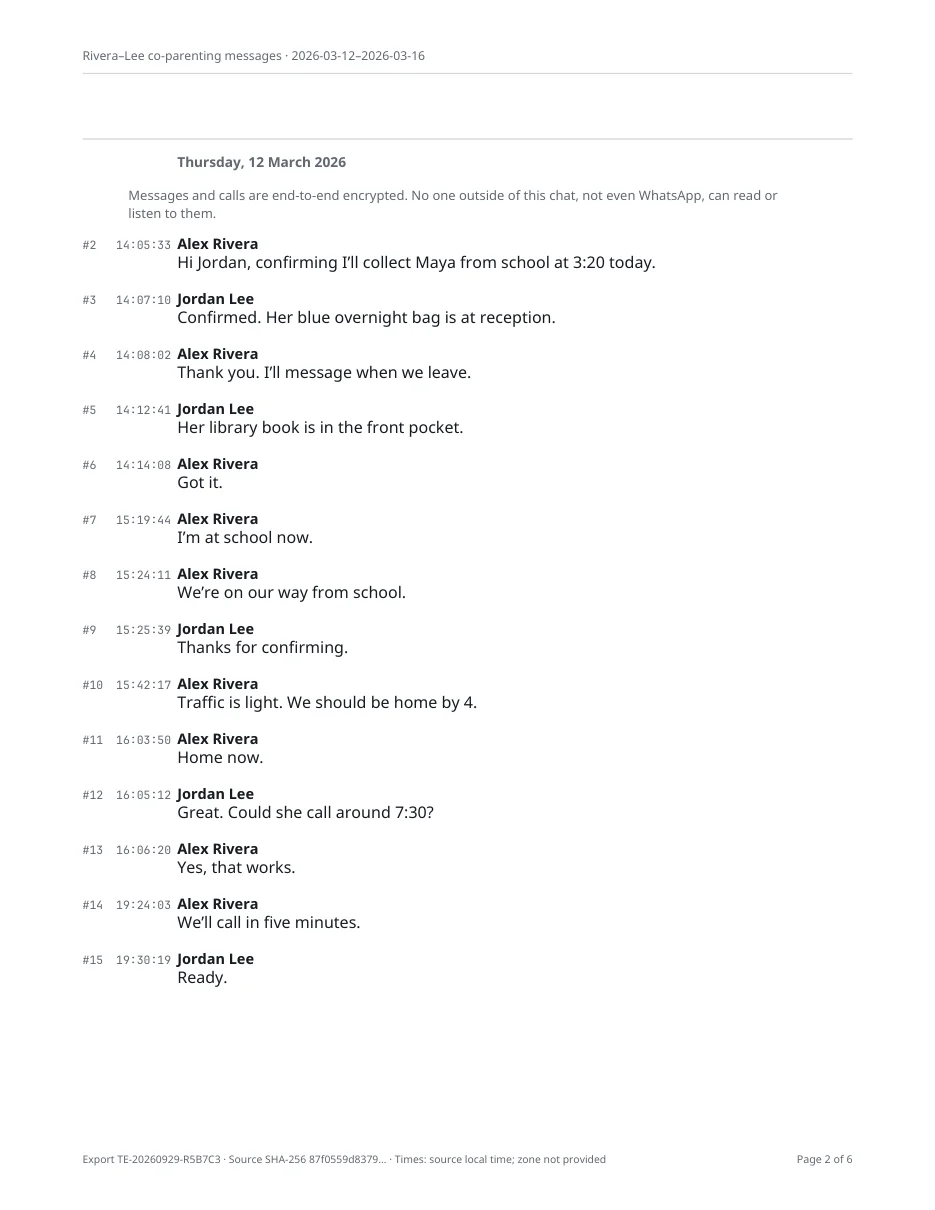
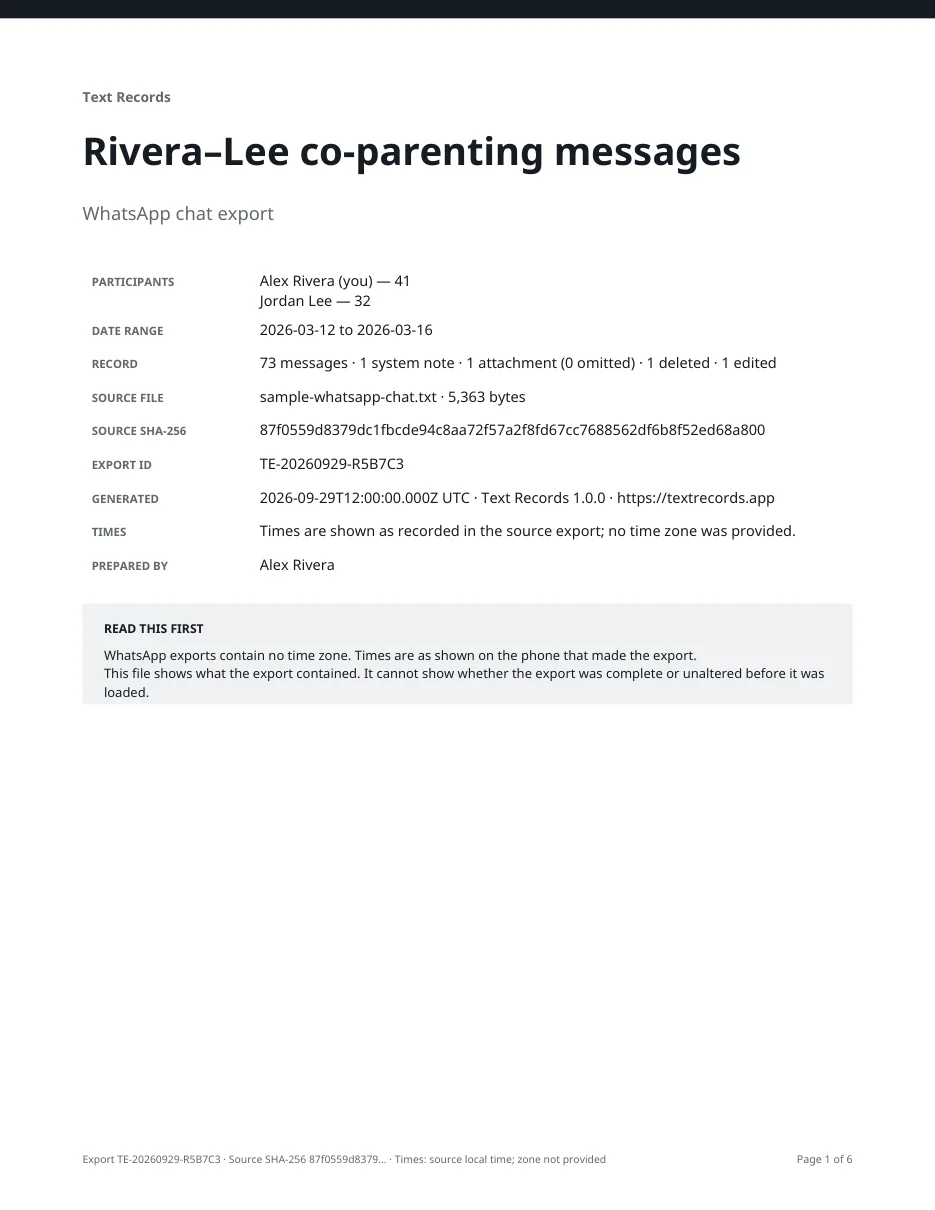
Cover page of a Text Records PDF transcriptTranscript page with a date header and a time and sender on every message
A real Text Records PDF from a sample chat
Does IRCC accept chats as proof of relationship?

Yes. The spouse document checklist (IMM 5533) asks couples who don't live together for "letters, printed text messages, emails or social media conversations, or other documented proof of contact". WhatsApp, Messenger, Instagram and iPhone texts all fit. Messages support the application; they don't settle it. Under the regulations, a spouse or partner doesn't count if the relationship is not genuine or was entered into mainly to get status (IRPR s. 4). General information only, not advice about your application.

10 pagesMaximum proof of contact (texts, chats, emails, letters) with the applicationcanada.ca ↗
20 photosMaximum relationship photos when the checklist asks for them, each with a short descriptioncanada.ca ↗
4 MBLargest file the Permanent Residence Portal acceptsircc.canada.ca ↗

Which relationship proof does your checklist ask for?

A quick guide to IRCC's checklists. Your own checklist and country-specific requirements always win.

How are you applying?
Do you live together now?
Answer the questions to see the best match

Answer both questions

Pick how you're applying and whether you live together to see which proof the checklist asks for.

Ten pages means choosing, not dumping

The checklist says "Provide a maximum of 10 pages with your application", and the complete guide repeats it. IRCC doesn't say how many messages a page may hold, so keep every page readable at normal zoom. Spread the pages across the relationship instead of filling them from one month, and keep the full chats on your phone. IRCC can ask for more proof of relationship later in processing, and the checklist says so.

Getting the messages off your phone

Use each app's own export where it has one. It keeps every sender, date and time. Then pick the pages you'll send.

WhatsApp export

  1. On iPhone, open the chat, tap your spouse's name, then Export chat. Without Media is enough for text pages.
  2. Save the ZIP file and keep it unchanged as your original.
  3. Turn the export into a dated, page-numbered PDF. Our free WhatsApp to PDF tool does it in your browser without uploading anything.
  4. Pick the pages you'll send and save them as one PDF under 4 MB.
Watch out for
  • View-once messages are not exported.
  • If Restricted chat, or the older Advanced Chat Privacy, is on, nobody in the chat can export it.
Best for
WhatsApp chats, the most common proof of contact
Time
A few minutes
Cost
Free

iPhone texts (iMessage and SMS)

  1. Set Settings › Apps › Messages › Keep Messages to Forever so older texts aren't removed.
  2. Print the conversation to PDF from a Mac, or use another method from our iPhone printing guide, so every message shows its sender, date and time.
Watch out for
  • Screenshots often leave out the phone number and the date, and only a few messages fit on each one.
Best for
Texts between the two of you
Time
10–30 minutes
Cost
Free to a few dollars

Messenger, Instagram, Telegram and others

  1. Request a download of your messages from the app. See our guides for Facebook Messenger, Instagram and Telegram.
  2. Turn the download into a readable PDF, then pick the pages you'll send.
Watch out for
  • Some apps take hours or days to prepare a download, so start well before you file.
Best for
Chats on other apps
Time
Minutes to a few days
Cost
Free

Example 10-page proof of contact

A fictional couple married abroad, living apart while the sponsorship is processed. One short exchange per stage, each matched to another document in the application.

PageWhat it showsDatesMatches
1Index: app, both phone numbers, who is who, how the pages were chosen—Your IMM 5532 answers
2WhatsApp, first weeks of contact after meetingMar 2023Where you said you met
3WhatsApp, planning the sponsor's first visitAug 2023Boarding passes, passport stamps
4WhatsApp, meeting each other's familiesDec 2023Photos from the visit
5Texts, deciding to marryApr 2024Engagement photos
6WhatsApp, wedding planningSep 2024Wedding invoices
7WhatsApp, after the wedding, apart againJan 2025Money transfers
8WhatsApp, ordinary daily contactJun 2025—
9WhatsApp, second visitNov 2025Boarding passes
10WhatsApp, recent contact near filingFeb 2026—

IRCC doesn't say whether an index page counts toward the 10. Counting it keeps you safely inside the limit. Text Records prints a message number on every message, so the index can say "page 3, messages 412–431".

Sources: canada.ca

Messages not in English or French need a translation

The guide says proof of communication such as "printed text messages, emails or social media conversations" must be translated. Send the original pages, the English or French translation and, unless a Canadian certified translator did it, an affidavit from the translator sworn before a notary public or commissioner of oaths. You, your spouse and your relatives can't translate them. The guide's list includes parents, siblings, grandparents, children, aunts, uncles, nieces, nephews and first cousins. A note you type in an app is your own translation and doesn't meet this rule.

Make the pages match the forms

Your messages are read alongside your forms. You and your spouse both sign the Relationship Information and Sponsorship Evaluation form (IMM 5532), and the checklist says that is where to explain if the sponsor never visited (Part C, question 4). If your forms say you met in March 2023 and first visited in August, a page of chats from those months backs them up. A date that doesn’t match raises a question you then have to answer.

Choose pages that line up with something else in the application: the first visit and its boarding passes, the engagement and its photos, the wedding, money sent while apart. Everyday contact counts too. A page of ordinary messages about work, meals and family shows a continuing relationship as well as a page of declarations does.

Make every page easy to read

Put a short index first. Give the app, both phone numbers or account names, who each one belongs to, and how you chose the pages, for example “one exchange from each stage of the relationship”. If a name in the chat is only how you saved the contact, say so.

Spell out dates in words, so 03/04 can’t be read as March or April. If you and your spouse are in different time zones, say which one the times are in. Our time zone guide explains how. Keep each exchange in its original order, and include the messages before and after so a reply makes sense.

Explain gaps briefly

A lost phone, a switch from one app to another, a period when you mostly called, or months with poor internet are all ordinary. One sentence in the index is better than leaving an officer to guess. Don’t rebuild missing chats from memory and present them as messages.

Keep the rest

The 10 pages are a selection, so keep the full chats on your phone and the original export files somewhere safe. Keep an exact copy of everything you upload. If IRCC asks for more proof, or for an interview, you can then show where each page came from.

If you pay anyone to help with the application, IRCC says they must be an authorized representative, such as a lawyer or a licensed consultant. Get advice if your history is complicated, if a previous application was refused, or if you’ve been asked to an interview. For couples applying in the US or UK, see texts for I-751, I-130 and UK partner visas.

Before you upload proof of contact

  • No more than 10 pages, readable at normal zoom, in one PDF under 4 MB.
  • Every message shows who sent it and the date. A page with no date at the top shows it some other way.
  • The pages cover the whole relationship, not one busy month.
  • The dates match your IMM 5532 answers, your photos and your travel records.
  • Both phone numbers or accounts are shown, and the index says who is who.
  • Anything not in English or French has a translation and translator's affidavit, unless a Canadian certified translator did it.
  • Gaps, a lost phone or a switch to another app are explained in a sentence.
  • Intimate or third-party content that adds nothing is left out of the pages you send.
  • The full chats stay on your phone, and you keep a copy of exactly what you uploaded.

What an export can't do

  • It shows what was in the chat when you exported it, not that the relationship is genuine.
  • It cannot bring back deleted, expired or view-once messages.
  • It does not translate messages or replace the translator's affidavit IRCC asks for.
  • It does not decide what IRCC asks for. Your checklist and country-specific requirements do.

Turn a chat into numbered, dated pages

Text Records exports a WhatsApp or Messages chat on your iPhone as a PDF with a sender, date and time on every message, and numbered messages you can point to from your index. Nothing is uploaded.

  • Sender, date and time on every message
  • Processed on your iPhone, nothing uploaded
  • Free to import, review and preview; prices shown before you start
Download on the App StoreDownload on the App Store

Text Records is an iPhone app

Point your iPhone camera at the code to install it. No account needed.

Questions people ask

How many pages of chat history can I send for spousal sponsorship?

A maximum of 10 pages. IRCC's spouse checklist (IMM 5533) and the complete guide (IMM 5289) both say so. IRCC can ask for more proof later if it needs it, so keep the full chats.

Can I send WhatsApp messages as proof of relationship to IRCC?

Yes. The checklist lists printed text messages, emails, letters and social media conversations as proof of contact. Export the chat, turn it into a dated PDF, and choose up to 10 pages from across the relationship.

Do we need proof of contact if we live together?

The spouse checklist asks for proof of contact when you don't live together. If you do, it asks for at least two sets of shared-home documents instead, such as a joint lease, joint bills or documents showing the same address.

Are screenshots of messages okay for spousal sponsorship?

IRCC asks for printed messages and doesn't ban screenshots. But screenshots often hide the date and the other person's number, and only a few messages fit on each, which uses up the 10 pages fast. An export shows the sender and date on every message.

Can I translate our chats myself?

No. IRCC's guide says translations must not be done by the applicants or members of their family. Use a Canadian certified translator, or a fluent translator who swears an affidavit before a notary public or commissioner of oaths.

Do I need to send chats from the whole relationship?

IRCC doesn't say which dates to choose. Pages spread across the relationship, from soon after you met to recent contact, show more than 10 pages from one month, and they should match the dates in your IMM 5532.

What if we mostly talked by phone or video?

Call logs and video call history can be other documented proof of contact. Choose pages that show the dates and the other person's number, and explain in a sentence how you usually kept in touch.

What file format does the Permanent Residence Portal accept?

IRCC's help centre lists PDF for application forms and supporting documents, plus JPG, JPEG, DOC, DOCX and PNG, with a limit of 4 MB per file.

Should we include intimate messages?

Usually not. They rarely add anything, and the 10 pages are better spent on visits, plans and everyday contact. Keep the full chat on your phone in case IRCC asks for more.

Related guides and tools

Sources

Checked on November 5, 2026. Platforms and rules change. If something is out of date, tell us.

  1. Document Checklist: Spouse (Including Dependent Children) (IMM 5533)Immigration, Refugees and Citizenship Canada
  2. Sponsor your spouse, common-law partner, conjugal partner or dependent child, complete guide (IMM 5289)Immigration, Refugees and Citizenship Canada
  3. Relationship Information and Sponsorship Evaluation (IMM 5532)Immigration, Refugees and Citizenship Canada
  4. Statutory Declaration of Common-Law Union (IMM 5409)Immigration, Refugees and Citizenship Canada
  5. How can my common-law partner and I prove we have been together for 12 months?IRCC Help Centre
  6. Is there a file size limit for documents I upload to my account?IRCC Help Centre
  7. What file formats can I upload to my account?IRCC Help Centre
  8. How to choose an immigration or citizenship representativeImmigration, Refugees and Citizenship Canada
  9. Immigration and Refugee Protection Regulations, section 1 (definitions)Justice Laws Website
  10. Immigration and Refugee Protection Regulations, section 4 (bad faith)Justice Laws Website
  11. How to export your chat historyWhatsApp
  12. About restricted chatWhatsApp
  13. Delete messages and attachments in Messages on iPhoneApple