
Situation, US, England & Wales
How to save harassing texts safely
Blocking, reporting and deleting can each change what is left of a chat. Here is how to keep a complete copy first, without tipping anyone off, and where to keep it so it stays yours.
On this page
Short answer
Before you block, report or delete, keep a complete copy of the conversation. In Messages, set Keep Messages to Forever and avoid Delete and Report Spam, which deletes iMessages. In WhatsApp, export the chat with media first. Telegram lets either person delete messages for both sides at any time, so export early. Keep the copy somewhere the other person cannot reach, and put your safety first.
General information, not legal advice. This page has not been reviewed by a lawyer. Rules differ by court and place, and they change. For advice on your situation, talk to a lawyer or a legal aid service.
Call 911 in the US or 999 in the UK. Your safety comes before saving messages. In the US, the National Domestic Violence Hotline is free and open 24/7 at 800-799-SAFE (7233), or text START to 88788. In the UK, the free 24-hour National Domestic Abuse Helpline is 0808 2000 247, and the National Stalking Helpline is 0808 802 0300 (weekdays, not 24/7). If someone may be checking your phone, contact them from a safer device.
What to do first
Pick the app and what you are about to do. Save first, then block or report.
Don't use Delete and Report Spam yet
Apple says reporting an iMessage as spam permanently deletes it from your iPhone. Make your copy first (print or export the conversation), then report. Reporting does not stop the sender from messaging you again; blocking does.
Set Keep Messages to Forever, then make a copy
Go to Settings › Apps › Messages › Keep Messages and choose Forever; the other choices remove older conversations automatically. Apple's blocking page says a blocked sender's messages are not delivered; it does not say blocking removes the conversation you already have. Make a copy before you change anything else.
Export the chat, then report
Use Export chat › Attach Media. Reporting sends WhatsApp up to five of the person's last messages and does not notify them. You can choose Report and block or just Report. Reporting a group removes you from it, so export a group chat first.
Export the chat with media now
WhatsApp says the chat stays in your list after you block someone, but the sender can delete a message for everyone for two days, and either of you can turn on disappearing messages. If Restricted chat (or the older Advanced Chat Privacy) is on, nobody in the chat can export it, so take careful screenshots instead.
Request your information from Accounts Center
Instagram calls it Export your information. Meta sends an email and an app notification when the file is ready, which can take up to 30 days, and you then have 4 days to download it. If someone can read your email, request it when that is safe.
Export soon from Telegram Desktop
Either of you can delete messages in a one-to-one chat for both sides at any time, and Telegram leaves no mark. Export the chat from Telegram Desktop (⋯ › Export chat history, JSON). Secret chats live only on the device where they started, so a Desktop export does not include them.
Use the app's own download, or capture carefully
Many apps have a data download but no chat export. Where there is none, take overlapping screenshots that show the profile, dates and times, and keep the originals unchanged.
Keep everything, change nothing
Answer the two questions for the first step for your app.
What can remove messages, app by app
Blocking is not a way to store messages. These are the actions, by you or the sender, that can take messages away.
| App | What can remove messages | What to do before you block or report |
|---|---|---|
| Messages (iPhone) | Delete and Report Spam permanently deletes an iMessage. Keep Messages set to 30 Days or 1 Year removes older chats. With Messages in iCloud, deleting on one device deletes everywhere. A sender can unsend an iMessage within 2 minutes. | Set Keep Messages to Forever, then print or export the conversation. |
| The sender can delete for everyone within 2 days, which leaves "This message was deleted". Either person can turn on disappearing messages (24 hours, 7 days or 90 days). Restricted chat, or the older Advanced Chat Privacy, stops anyone exporting the chat. View-once messages are never exported. | Export the chat with media. Blocking keeps the chat in your list. | |
| Telegram | Either person can delete any message in a one-to-one chat for both sides, at any time, with no mark left. | Export from Telegram Desktop as soon as you can. |
| Messenger | Unsend for Everyone removes a message for everyone in the chat. | Request your information from Accounts Center, or Messenger's message storage download for encrypted chats. |
| Vanish mode messages are made to disappear from the chat. | Request your information from Accounts Center. Think before screenshotting a vanish mode chat (see below). |
Sources: support.apple.com, support.apple.com, support.apple.com, faq.whatsapp.com, faq.whatsapp.com, faq.whatsapp.com, faq.whatsapp.com, telegram.org, messenger.com, help.instagram.com
Who might find out that you saved a copy
Saving a copy is usually silent, but a few steps send a notice to someone.
| Step | Who is told |
|---|---|
| Screenshot of an Instagram vanish mode message | The other person. Instagram says it notifies them if it detects a screenshot. Vanish mode may not be available in Europe. |
| Instagram or Facebook information export | You, by email and app notification when it is ready. Anyone who can read your email or open your account could see it. |
| Reporting someone on WhatsApp | WhatsApp. The person or group you report is not notified. |
| Changing what you share on iPhone | Apple warns that changes to sharing or access may be noticed by others. |
| Exporting in Text Records | Nobody. The app works on your iPhone and sends nothing anywhere. It is hidden in screenshots and can be locked with Face ID or your passcode. |
Sources: help.instagram.com, help.instagram.com, faq.whatsapp.com, support.apple.com
Where to keep your copy
- Keep at least one copy on a device and account only you can open. Avoid a shared family plan, a shared cloud folder, a work phone or an email account the other person may know the password to.
- Keep the whole conversation, including your own replies, the person's number or username, dates, times and attachments.
- Leave the original untouched. Highlight, add notes or redact only on a second, working copy.
- Write down when you made each copy and how, for example "WhatsApp export with media, 5 October 2026".
- Give copies only to the people who need them, such as police, a lawyer, an advocate, HR or a housing officer, and keep a note of what you gave and when.
- Keep saving new messages as they arrive. Don't reply to create more of them.
Changes can be noticed. Apple's Personal Safety guide warns that changes to sharing or access may be noticed by others. On iPhone, Safety Check (Settings › Privacy & Security › Safety Check) shows who and which apps you share with, has an Emergency Reset, and has a Quick Exit button that closes Settings at once. A domestic abuse or stalking advocate can help you decide what to change and when, and how to save messages without being noticed. Don't factory-reset the phone first: it removes the messages you may need.
Neighbors, coworkers and strangers
The steps are the same whoever is sending the messages: keep the whole conversation, make a copy before you block or report, and store it where only you can reach it.
A neighbor. Keep texts and app messages together with the rest of the record, such as letters, photos and any report numbers from a landlord, housing manager or the police. Ask the person you report to what format they want, for example a PDF, printouts or the original files.
A coworker or manager. Save messages you are allowed to keep, such as texts to your own phone. Don’t forward company files or other people’s private information to a personal account just to build a file. The HR complaints guide covers what to hand over and how.
Someone you don’t know. Save each message with its number or username and the time, and don’t reply. Numbers can be spoofed and accounts can be made in minutes, so save what you see and let the police or the platform work out who is behind it.
When you hand the messages over
Keep the complete copy, and give the person you report to a focused set with enough context to make sense of it. Keep a note of what you gave, to whom and when. A saved copy supports your own account of what you received. It does not prove who sent a message or decide what happens next. See preserving messages and authenticating texts.
General information only; police, prosecutors and courts decide. In England and Wales, the Protection from Harassment Act 1997 bans a course of conduct that amounts to harassment when the person knows or ought to know it does, and a course of conduct means at least two occasions for one person. Call 999 in an emergency or 101 otherwise. In the US, protective orders come from state, tribal and territorial courts, each with its own forms; federal law (18 U.S.C. § 2261A) covers some stalking through online and electronic services. Call 911 in an emergency.
What a saved copy cannot do
- It shows what you received and kept, not who was holding the phone or account when a message was sent.
- It cannot bring back messages that were already deleted, expired or never exported.
- It does not decide whether something counts as harassment. Police, employers, landlords and courts each decide that.
- It is not a safety plan. An advocate can help with that.
Keep the chat as a dated record, on your phone
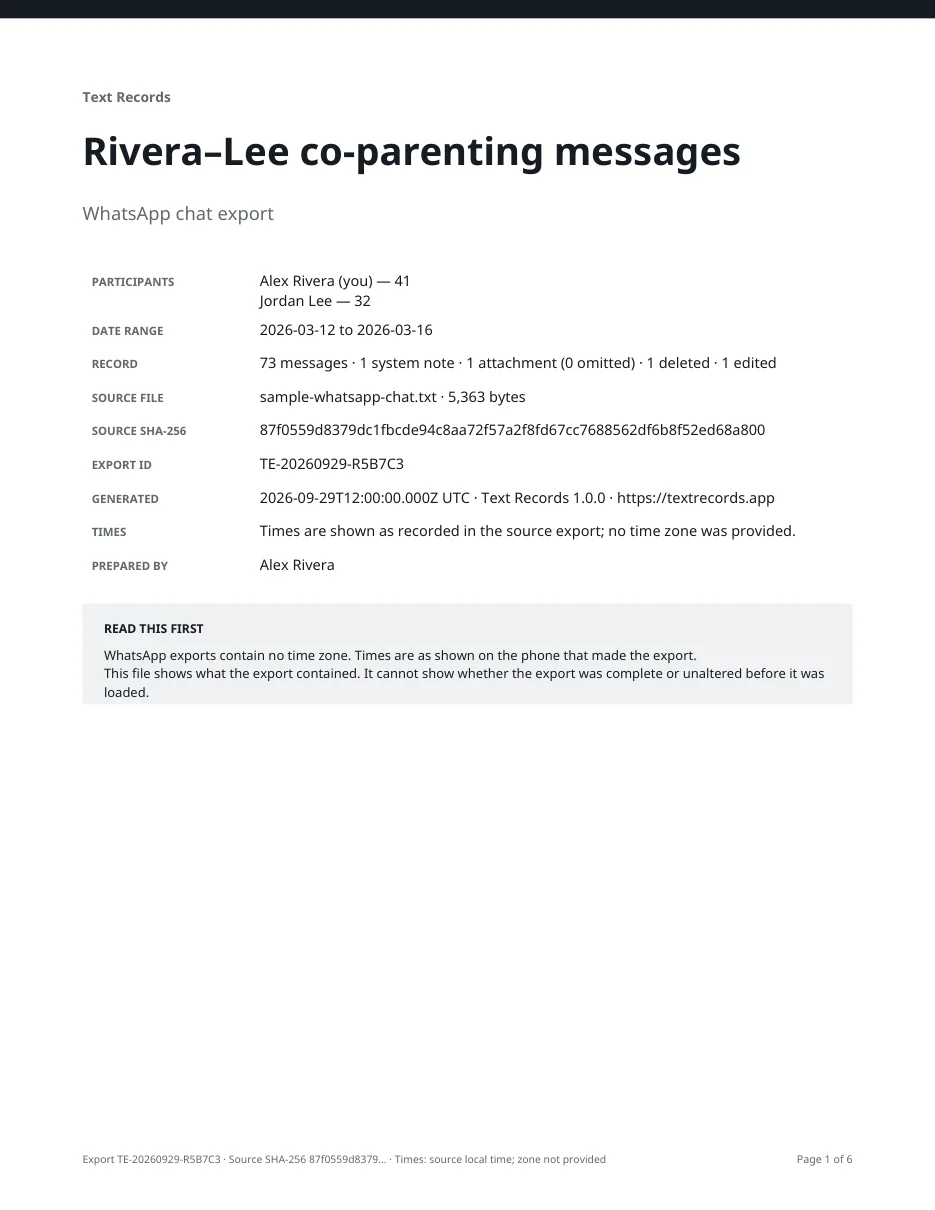
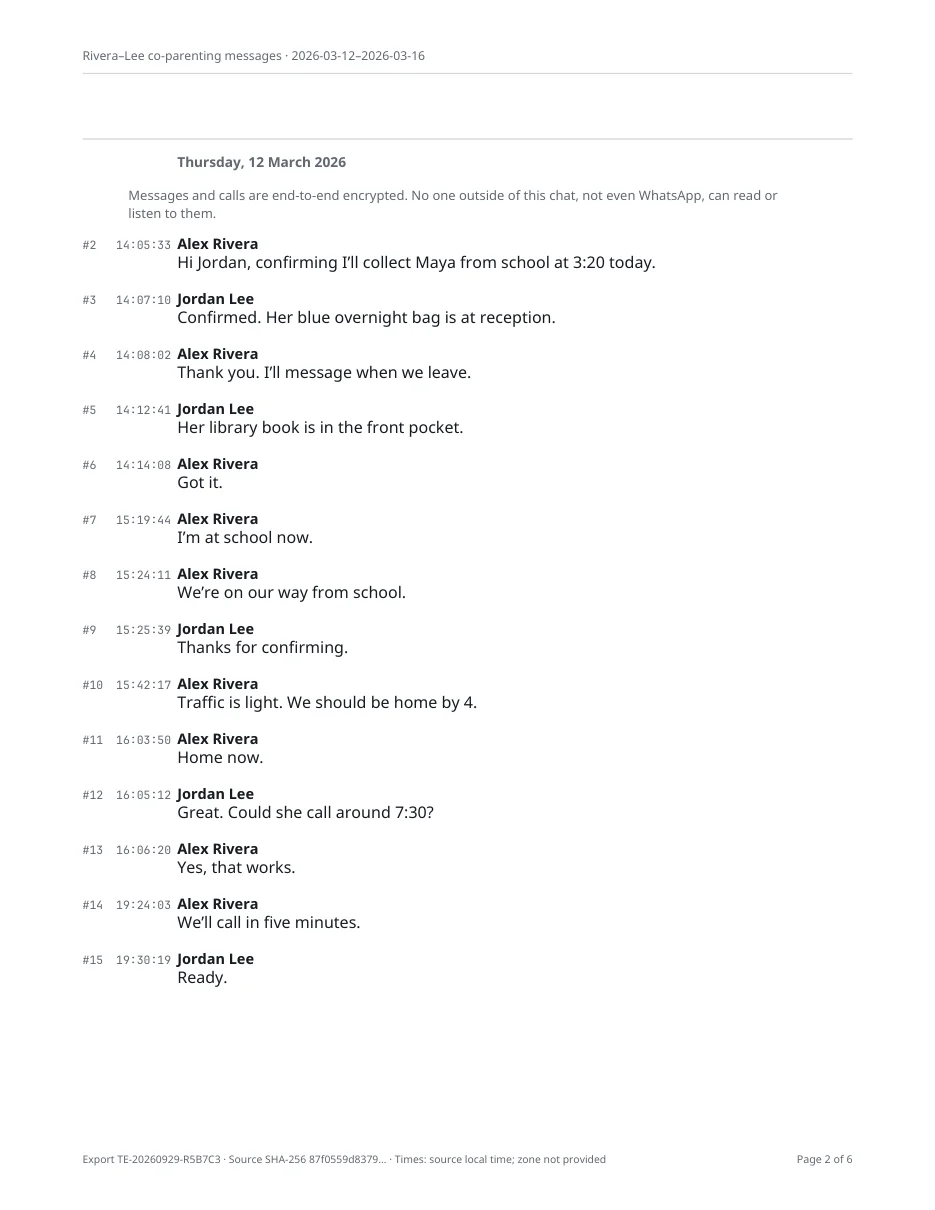
Text Records turns a Messages, WhatsApp, Instagram, Messenger or Telegram chat into a PDF with a sender, date and time on every message. Imported messages are never changed, nothing is uploaded, and the app is hidden in screenshots.
- Sender, date and time on every message
- Processed on your iPhone, nothing uploaded
- Free to import, review and preview; prices shown before you start


Text Records is an iPhone app
Point your iPhone camera at the code to install it. No account needed.
Questions people ask
Does blocking someone on iPhone delete their texts?
Apple's page on blocking says a blocked person's messages are not delivered and that they can still leave a voicemail. It does not say blocking removes the conversation you already have. Set Keep Messages to Forever and make a copy before you block.
Does blocking someone on WhatsApp delete the chat?
No. WhatsApp says the existing chat stays in your chat list when you block someone, and suggests saving a copy. Export it with media first.
Will they know if I report them on WhatsApp?
WhatsApp says the person or group you report is not notified. WhatsApp receives up to five of their last messages to you.
Should I reply to harassing texts?
You don't have to. Many people find it safer not to reply. If police, a lawyer or an advocate suggests one short message asking for no contact, keep it brief and save it with the rest.
Are screenshots enough?
For a few messages they can help, but they often miss the phone number, the exact time and what came before. A full export keeps every message with its sender and time. See screenshots vs exports.
What about threatening texts from unknown or changing numbers?
Save each one with its number and time, even if you think you know who sent it. Numbers can be spoofed, so a contact name or writing style is not proof of who sent a message. Give the numbers to the police rather than trying to trace them yourself.
Can deleted messages be recovered?
Text Records cannot recover deleted messages; it exports what is still on your phone or in an app's export. On iPhone, recently deleted messages can be restored for a limited time. See preserving messages.
Related guides and tools
Sources
Checked on October 5, 2026. Platforms and rules change. If something is out of date, tell us.
- Report spam and block senders in Messages on iPhoneApple
- Block phone numbers, contacts, and emails on your iPhone or iPadApple
- Delete messages and attachments in Messages on iPhoneApple
- Unsend and edit messages on iPhoneApple
- Safety Check for an iPhone with iOS 16 or laterApple Personal Safety User Guide
- Safety considerationsApple Personal Safety User Guide
- How to block and report someoneWhatsApp
- How to export your chat historyWhatsApp
- About restricted chatWhatsApp
- About disappearing messagesWhatsApp
- How to delete messagesWhatsApp
- Telegram FAQTelegram
- Chat Export Tool, Better Notifications and MoreTelegram
- Remove a message you've sent on FacebookMessenger
- Send messages in vanish mode on InstagramInstagram
- Review and export a copy of your Instagram informationInstagram
- National Domestic Violence Hotlinethehotline.org
- National Domestic Abuse HelplineRefuge
- National Stalking HelplineSuzy Lamplugh Trust
- Contact the policeGOV.UK
- Domestic violenceUS Department of Justice
- Protection from Harassment Act 1997legislation.gov.uk
- 18 U.S.C. § 2261A, StalkingLegal Information Institute